Your DIKULT105 final assessment: an interactive work about speculative digital futures, a 2000-word written document, a working URL and a video walkthrough.
itch.io is recommended. GitHub or another public host also works.
A broken or private link may fail. A nickname is fine.
FUTURE GENERATOR
Futures from the brief: climate change, pandemics, extinction, environmental loss, talking with other planets, AI and fresh water, AI and office jobs, AI and creativity.
? + ? + ?
Not your idea? Spin again. Your own idea always wins.
THE WORK + THE TEXT / CHECK THE CONNECTION
What does good work show?
The DIKULT105 brief asks for a creative interactive piece and an analysis of its theme, genre and process. UiB's course outcomes also include analysing design and aesthetics, using relevant theory and discussing your own work. Read the course outcomes ↗
LAB GUIDANCE / NOT AN ADDITIONAL MARKING RUBRIC
Use these questions to improve the connection between what you made and what you write. The DIKULT105 brief and course instructions govern the assessment.
One grade covers the assessment portfolio. The practical work and its written analysis should make sense together. UiB lists the A–F grading scale for this course.
Use the same creative decisions in your work, analysis and walkthrough.
DIKULT105 focus
Show it in the work
Explain it in the text
Speculative digital futures
Let an interaction reveal something about your imagined future.
Explain the future you imagine and how the work addresses the theme. Point to a specific moment.
Creative interaction
Give the visitor an action that matters to the experience. A sound piece, artwork, artistic game or creative website can work.
Explain what the action changes and why you chose it.
Genre and research
Use conventions of the form you chose, or adapt them deliberately.
Identify the genre or combination of genres. Use relevant sources to explain your choices, including similarities and differences.
Design and aesthetics
Make deliberate choices about language, image, sound, timing, navigation or other senses.
Analyse how those choices shape the visitor's experience. Aesthetics includes how the work feels and behaves.
Creative process
Develop and test a manageable interaction.
Discuss a concrete challenge, a decision, what happened and what you changed or learned. Include limitations you can explain.
A functioning submission
Publish an accessible version and show it working in the video.
Label the work and video links clearly. Make your analysis correspond to the submitted version.
Aiming for a strong result?
Choose a clear idea, make the interaction serve it, and support your analysis with examples from the work and sources you have read. Explain your judgement: why this choice, what effect did it have, and what evidence supports your interpretation?
UiB's general A–F descriptors emphasise quality, judgement and independence. They are general descriptors; the course's own assessment instructions determine how your submission is assessed.
How does the A–F scale work?
A / Excellent
Clearly outstanding work, very good judgement and a high degree of independence.
B / Very good
Very good work, judgement and independence.
C / Good
Good work across most areas, with judgement and independence in the important areas.
D / Satisfactory
Acceptable work with significant shortcomings and some independent judgement.
E / Sufficient
Meets the minimum requirements, with limited judgement and independence.
F / Fail
Does not meet the minimum academic requirements.
Plain-language summary of UiB's general descriptors ↗. These are not separate DIKULT105 criteria for each component.
Optional idea rooms: futures, games, senses and sound
ROOM A · THE FUTURE FORGE
Alinta’s idea, from her lecture on design futures: the future is plural, and design can help shape which one we get.
Which future are you building?
Spin the dial. Four ways a future can go.
My future is a ___ future.Growth: Today’s systems keep going, and so do their consequences.Collapse: Something big breaks down. What is left, and who is left?Discipline: Life is reorganised around a limit: water, energy, time.Transformation: Something changes at the root: technology, society, us.
BACKCASTING · START AT THE END
2040clean water for everyone
2032What had to be built?
2028Who had to agree?
TodayYour prototype: one early step.
PREFERRED FOR WHOM?
Better for who?
Who gains? Who is left out, moved on or made invisible?
Every fix changes the problem. You cannot solve it all, but you can shine a light on it.
DESIGN FICTION
Pretend it is already here
A warning sign, a product label, an app screen from 2050. Write your world as fact, and let the visitor step inside.
YOUR PROCESS
Frame, research, try, test
Choose a topic. See how others did it. Sketch options. Build the smallest version. Test it.
IN YOUR FINAL WORK Part 2 of your text: name your kind of future, who it is preferred for, and how your work is one early step. The frame, research, try, test loop is your process story in part 4.
ROOM B · THE GAME MACHINE
Alinta’s idea, from her lecture on designing, creating and analysing games: a game is built from parts you can name, and every rule says something.
Five parts. Tap them.
Tap a part. You built all five in Lab 4.
Rule
A limit on what can happen.
IN CONSTRUCT A condition.
visits ≥ 3
Mechanic
How the world works when someone acts.
IN CONSTRUCT An action.
Add 1 to visits
State
The situation right now.
IN CONSTRUCT A variable.
visits = 2
Dynamics
Patterns that appear while people play.
IN CONSTRUCT You do not code this. You see it when you test.
Testers tap fast to reach the message.
Aesthetics
How it feels.
IN CONSTRUCTSound, pace, colour, words.
Calm, tense, lonely, playful.
CHOOSE
Like Life is Strange
Choices shape what happens later.
Construct: a variable remembers the choice.
DISCOVER
Like Gone Home
Explore rooms. Piece together what already happened.
Construct: hidden notes in rooms, like your Lab 3 secret.
RULES ARGUE
Your system has an opinion
Papers, Please argues through what its rules make you do. If saving water costs points in your future, your rules say something.
Rules or story? One way of studying games looks at rules and play, another at story. Your work can be both. Not a game at all? Fine. Use game parts only when they serve the work.
FLOW CHECK · USE IT WHEN SOMEONE TESTS (LAB 7)
IN YOUR FINAL WORK Part 3 of your text: describe how your work works with these words (rule, mechanic, state). Part 4: what testers did is your dynamics, and what you changed after the flow check.
BEYOND THE SCREEN · FROM ALINTA’S LECTURE
Close your eyes. Is it still art?
Aesthetics comes from the Greek aisthetikos: “of sense perception”. Not only what looks good. Seeing is believing, but looking is only one way in. The brief even names an interactive sound piece.
SOUND AS VIBRATION
Hear
Sound travels through air, water and solids, not through a vacuum. Humans hear about 20 to 20,000 Hz.
River ListeningLeah Barclay with the Australian Rivers Institute, 2014–Listening to rivers, under the surface.
What Stirs Between?Camille Norment, 2023Visitors sit or lie down and feel the voices vibrate through wood.
Department of XNanna K. Hougaard, 2019An algorithm rearranges eight researchers into a conversation that never happened.
IN CONSTRUCT Add the Audio object. Right-click Sounds › Import sounds. Event: on tap › Audio › Play. A variable can set the volume.
IN YOUR FUTURE What will a future river, city or forest sound like? Make one sound the visitor can only find by listening.
TEXTURE AND PRESSURE
Touch
Museums say look, don’t touch. Digital work does not have to.
JabblrsBritt Ransom, 2016Silicone objects with electronics and code. Dogs play with them, with their mouths.
Elephant “jukebox”Fiona French, 2014–2021Elephants use their trunks on tactile controls to trigger sounds.
Good Night LampAlexandra Deschamps-Sonsino and collaborators, 2005–2015Switch your lamp on, and a lamp in someone else’s home lights up.
IN CONSTRUCT Touch › On hold gesture rewards patience. Drag & Drop lets them push things. Browser › Vibrate buzzes phones that support it.
IN YOUR FUTURE In your future, what can no longer be touched? Let the visitor hold, press or wait instead of just look.
KINAESTHESIA AND PROPRIOCEPTION
Move
Knowing where your body is, and how it moves.
Wooden MirrorDaniel Rozin, 1999Hundreds of wooden pieces tilt to mirror the person in front of it.
Rain RoomRandom International, 2012It rains everywhere, except where you walk.
MIMICRYSougwen Chung, 2015A robot arm draws alongside the artist, copying the artist’s lines.
IN CONSTRUCT Every tick › Set position to Mouse.X, Mouse.Y (or Touch.X, Touch.Y). The world can follow, flee or copy the visitor.
IN YOUR FUTURE What in your future moves away when you come near? Or what only appears when you hold still?
VESTIBULAR PERCEPTION
Balance
Balance: the sense that tells you which way is up.
Can’t Help MyselfSun Yuan and Peng Yu, 2016A robot arm keeps trying to sweep a spreading liquid back into place.
tele-present waterDavid Bowen, 2011Live data from a buoy far away moves a grid of wires like the sea.
IN CONSTRUCT On a phone, Touch gives the tilt: Touch.Beta and Touch.Gamma. On iPhone, add Touch › Request permission first.
IN YOUR FUTURE A future that will not stay level: let the visitor tilt the phone to keep something from spilling.
INTEROCEPTION
Inside
Conditions within the body: heartbeat, breath, hunger.
Pulse RoomRafael Lozano-Hemmer, 2006Your heartbeat becomes a flashing light bulb among hundreds of others.
BioMuse performanceAtau Tanaka, early 1990s–Signals from the body play the music.
Data Garden QuartetData Garden, 2012Signals from plants become music through MIDI.
IN CONSTRUCT Construct cannot read a heartbeat, but it can fake one: System › Every X seconds, where X shrinks as a variable grows. A pulse that speeds up.
IN YOUR FUTURE What does the body feel in your future: thirsty, tired, calm? Give your work a pulse.
DATA MADE SENSIBLE
Invisible
Turning what we cannot sense into something we can. MIDI does this: control messages become sound.
Electrical WalksChristina Kubisch, 2003Induction headphones make electromagnetic activity audible.
Amphibious ArchitectureThe Living Architecture Lab and NYU Environmental Health Clinic, 2009Lights on the river respond to fish and water quality.
IN CONSTRUCT Translate one number into another sense: a variable sets a volume, a colour, a speed. Start with your own made-up data.
IN YOUR FUTURE What is invisible in your future: the water, the air, the AI? Make it heard, felt or seen.
THE EYES-CLOSED TEST
Let someone try your work for ten seconds with their eyes closed, or with the screen turned away. What is left? That is your work beyond the screen.
Works from Alinta’s lecture “Digital art beyond the screen”. Find them by name for photos and sources, and cite what you use.
ROOM C · THE SOUND & MEDIA STUDIO
This builds on Hanna’s labs at the start of the semester: clean your sound in Audacity first, then bring sound, pictures and video into your work.
Make it sound like your future.
Bring it in. Record with the microphone button and keep the meter out of the red. Or drag a sound file into the window. Install FFmpeg so Audacity opens most formats.
Room tone. Record 10 seconds of silence first. Select it › Effect › Noise Reduction › Get Noise Profile. Select all (Ctrl/Cmd + A) › Noise Reduction › OK.
Cut. Zoom in. Select the “um” or the silence, listen, then Delete. Edit › Clip Boundaries › Split to move a part.
Level. Effect › Normalize to -1 dB. Peaks hitting red are clipping: record again a little quieter.
Blend. Effect › Fade In or Fade Out. Overlap two tracks and use Crossfade Tracks for a smooth change.
Export. File › Export › MP3. Keep the .aup3 project file so you can edit later.
INTO CONSTRUCT · CHECKED IN THE REAL EDITOR
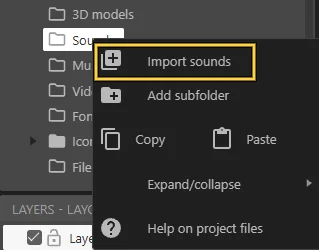
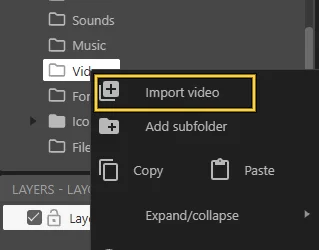
Right-click Sounds › Import sounds for short effects. Long music or ambience: Music › Import music.
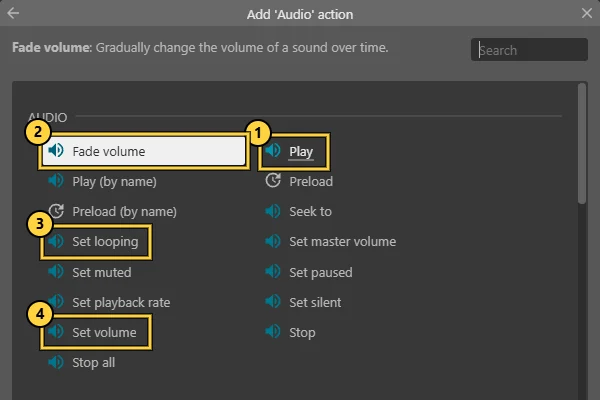
Insert the Audio object, once per project. Then an event › Audio › Play ①. Also try Fade volume ②, Set looping ③ and Set volume ④.
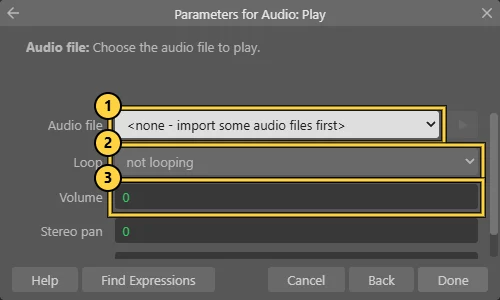
In Play: choose the file ①, loop ②, volume in dB ③ (0 is full, -10 is quieter). Give it a tag to stop or fade it later.
Make it react: Set volume from a variable, or Play at object so the sound sits somewhere in the room.
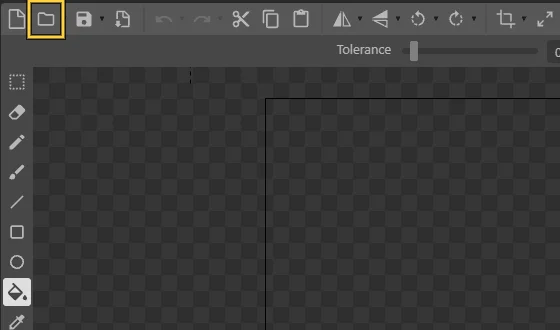
Insert a Sprite (or a Tiled Background for a repeating floor). In the image editor, Load images from files.
Several images become the frames of one animation: a flickering light, a breathing wall.
Draw, photograph or make your own images, or credit whose they are. Screenshots of your work become Figure 1, Figure 2 in your text.
Right-click Videos › Import video.
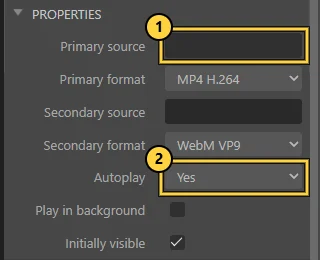
Insert the Video object. Properties › Primary source ①: your video. Autoplay ② Yes or No.
In events: Video › Play, Pause or Set source to change what is shown. MP4 (H.264) plays in most browsers.
THE BROWSER RULE
Silent until the first tap
Browsers do not play sound before someone taps or clicks. Start with a “Tap to enter” screen. Test the exported itch.io version with sound on, not only Preview.
FOR EVERYONE
Captions or a transcript
Speech in your work? Add captions or a written transcript. YouTube can draft one; correct it yourself.
CREDITS
Whose sound is it?
Sounds from freesound.org ↗ come with a licence. Check it, credit the creator and add it to your references.
IN YOUR FINAL WORK A sound, picture or video layer that carries your future. Credit everything you did not make. In your video walkthrough, let the sound be heard.
GATE 2 · THE TEXT
2000 words: theme, genre and process.
Write the document yourself, in English or Norwegian. The brief allows AI only for light editing when you submit in English.
0WORDS · AIM 2000 · BAND 1800-2200
0180022002600
1800 words to the minimum (1800).
1 · The link
0 words
Label the interactive work URL and the video walkthrough URL clearly near the start of your document. These are submission links, not research references.
2 · The theme
0 words
Analyse the imagined future, how your work addresses it and how the interaction connects to the theme. Use a specific moment from the work as evidence.
3 · The genre
0 words
Identify your genre or combination of genres. Explain relevant conventions and how your work uses or changes them. Connect the analysis to sources you have read. Game vocabulary is useful when your work calls for it.
4 · The process
0 words
Explain how you made the work. Choose a specific challenge, decision or test and discuss its effect. Show what changed and why; you can also discuss a remaining limitation.
Opening and ending
0 words
Optional opening and ending: introduce the work, then draw together what the analysis has shown.
Saved only in this browser on this device. Nothing is sent anywhere. Keep your real copy in your own document. Suggested word counts are only a guide.
THE CITATION DESK / CHICAGO AUTHOR-DATE
Chicago author-date: how to cite
Use Chicago author-date consistently for your in-text citations and References list. These examples follow Chicago 18. It has two connected parts: the short author–year citation next to the idea, and the full source in References at the end of your document. Follow any more specific course instructions.
Find the source details. Author, year, title and the page or other locator you actually used.
Cite beside the idea. Write (Surname Year, page). There is no comma between the name and year.
Add the full source once. Choose its type below and complete the reference.
Match the two. The same creator and year must lead the reader from the citation to the reference.
When you paraphrase
Explain the source’s idea in your own words, then cite it. Your own wording still needs a source.
[Your explanation of the passage] (Jørgensen 2013, [page]).
When you quote
Copy the exact words, use quotation marks and cite the page or locator. Put the citation before the sentence’s final full stop.
“[Exact words checked against the source]” (Jørgensen 2013, [page]).
Replace every [bracketed field]. These are format templates, not sentences to submit. The book and journal article below are real publications; no quotation or claim about a particular page is supplied.
01 / Book or e-book
In your text
(Jørgensen 2013) For a particular passage: (Jørgensen 2013, [page])
In your reference list
Jørgensen, Kristine. 2013. Gameworld Interfaces. MIT Press.
Real book. Replace [page] with the page you actually used. Cite the edition you read. For an online book, add its DOI, stable URL or database as appropriate. For an unpaginated edition, identify a chapter or section. Check the publisher record ↗
02 / Research article
In your text
(Jørgensen 2012) For a particular passage: (Jørgensen 2012, [page])
In your reference list
Jørgensen, Kristine. 2012. “Between the Game System and the Fictional World: A Study of Computer Game Interfaces.” Games and Culture 7 (2): 142–63. https://doi.org/10.1177/1555412012440315.
Jørgensen, Kristine
Author of the article
2012
Publication year
“Between the Game System …”
Article title, in quotation marks
Games and Culture
Journal title, in italics
7 (2)
Volume 7, issue 2
142–63
Complete article pages: 142–163
https://doi.org/…
Permanent link to the article
Real article. Collect author → year → article title → journal → volume (issue) → full article page range or article number → DOI. The reference gives the whole article; the in-text citation gives your particular page. Cite the article itself, even if you found it through NVA, Oria or Google Scholar.
03 / A chapter in an edited book
In your text
([Chapter author surname] [Year], [page])
In your reference list
[Chapter author surname], [First name]. [Year]. “[Chapter title].” In [Book title], edited by [Editor first name and surname]. [Publisher]. [DOI or URL, if applicable].
Template. The chapter author goes first. The editors belong after the book title. Chicago 18 no longer requires the chapter’s complete page range in the reference; cite the actual page you use in your text. If you read only one chapter, do not attribute its argument automatically to the editors.
Real page with no listed publication or revision date. Use the named author or responsible organisation; write an organisation’s name once, in full. A personal author starts Surname, First name. Use the publication/revision year when supplied. Only when no date is given, use n.d. and add your actual access date. If there is no author or organisation, begin with the title and cite a shortened title in the text.
05 / A game, app or interactive digital work
In your text
([Creator or developer] [Year])
In your reference list
[Creator or developer]. [Year]. [Title of work]. [Version, if relevant]. [Game, app or interactive artwork; platform]. [Publisher, if different]. [URL, if applicable].
Template for a formal reference to a work you analyse. A personal creator starts Surname, First name; a studio name is written once, in full. Use the credited creator and the version you examined. Identify a scene, level or action in your discussion so the reader can locate your example.
06 / Image, artwork or someone else’s screenshot
In your text
([Artist surname] [Year]) In a figure caption: Figure 1. [Description]. Source: [Creator] [Year], [locator].
In your reference list
[Artist surname], [First name]. [Year]. [Artwork title]. [Medium]. [Collection or institution, if relevant]. [URL, if viewed online].
Template. A screenshot of another person’s work needs a source for that work; credit an image’s photographer or source where applicable. Use a caption and a matching reference. For your own new project screenshot, “Figure 1. [What it shows]. Screenshot by the author, [year]” makes its origin clear. Give any reused material its own credit.
07 / Video, recorded talk, podcast or sound recording
In your text
([Creator surname or channel] [Year], at [timestamp])
In your reference list
[Creator or channel]. [Year]. “[Recording or episode title].” [Programme, series or platform]. [Month day, if given]. [Video, podcast audio or sound recording], [duration]. [URL].
Template. A personal creator starts Surname, First name; a channel name is written once, in full. Give a timestamp for a particular moment and specify the recording type. A stand-alone musical work may use an italicised work title. For a reused sound asset, also record the creator’s requested credit and licence.
08 / Lecture, lecture slides or course material
In your text
([Lecturer surname] [Year], slide [number])
In your reference list
[Lecturer surname], [First name]. [Year]. “[Exact lecture or material title].” [Lecture slides or course handout], DIKULT105, University of Bergen, [Month day]. MittUiB. [Course material URL].
Template for retrievable material. Use the real lecturer, title, date and slide number. If you only heard an unrecorded remark, explain it as a personal communication in the text with its date; it is normally omitted from the reference list. Do not invent a slide number or a publication record.
09 / Code, templates, software or downloaded assets
In your text
([Creator or organisation] [Year])
In your reference list
[Creator or organisation]. [Year]. [Title]. [Version or release]. [Software, code repository or asset type]. [Repository or publisher]. [DOI or stable URL].
Template for a formal reference. A personal creator starts Surname, First name; an organisation name is written once, in full. Identify the release or commit when it matters. Credit borrowed code, Construct templates, fonts, images and sounds in the project and your discussion. Keep the licence and requested attribution. Cite the original record.
Two authors, several authors, missing pages or the same year?
Two authors:(Surname and Surname Year, page).
Three or more authors:(FirstSurname et al. Year, page). In Chicago 18, list up to six authors in the reference; if there are more than six, list the first three followed by et al. Preserve the source’s author order.
Same author, same year: use 2026a and 2026b in both places, assigned by the alphabetic order of the titles.
No stable pages: use a chapter, named section, paragraph number when available, or recording timestamp. Do not use the browser’s printed page number as though it belonged to the source.
A source cited inside another source: find and read the original where possible. If you cannot, acknowledge the secondary citation and list the source you actually read.
Build your References list
Order entries alphabetically by surname or responsible organisation. For the same author, order by year.
Put the year immediately after the creator’s name. Invert the first personal author’s name: Surname, First name.
Use italics for book, journal and stand-alone work titles. Use “quotation marks” for article, chapter and web-page titles.
Use a hanging indent: the second and later lines of each entry start slightly to the right.
Check creator, year, title, edition, pages and DOI against the source. Check automatically generated references too.
Chicago 18 does not require a publisher’s city for a book. Article references still need the complete page range or article number where available.
What does a finished reference list look like?
References
Jørgensen, Kristine. 2012. “Between the Game System and the Fictional World: A Study of Computer Game Interfaces.” Games and Culture 7 (2): 142–63. https://doi.org/10.1177/1555412012440315.
Jørgensen, Kristine. 2013. Gameworld Interfaces. MIT Press.
Example layout using the three real sources above, ordered by author and year. Include the sources you actually cite and have read; replace this example with your own list.
What needs a citation in my project?
Cite ideas, quotations, definitions, data and works you analyse. Credit material you reuse, including code and media. Your observations of your own new prototype can be described directly and illustrated with labelled screenshots. Your work and walkthrough links identify the submitted project; they do not replace research references.
Use the references you actually read. Choose sources that help your analysis; the supplied DIKULT105 brief gives no fixed source count. Citing an AI tool does not override the assessment’s AI restrictions. Read the AI rules →
You submit a link, not your Construct file. If the examiners cannot open it, they cannot grade it.
GATE 4 · THE VIDEO
Show it working, in its best light.
The video helps the examiners see what they might miss. You do not have to speak.
GATE 5 · AI RULES
Your work, your words.
THE WORK
No AI in making it
Do not use AI in creating the interactive work unless you are specifically addressing AI as part of speculative digital futures.
Alinta explains the permitted scope in class. Ask her if you are unsure before using it.
THE TEXT
Do not let AI write it
A text that looks mostly AI-written may not pass.
Parts that look AI-written may not be read. Light editing is allowed if you write in English.
FINAL GATE · INSPERA · WEEK 50
Light all seven seals
Ready. Upload your text to Inspera in week 50. The exact deadline is there.
The official DIKULT105 assessment brief in MittUiB → Files, course updates and Inspera govern the hand-in. Check required file format and how references or captions count towards the word limit there.